MSC Apex automation toolkit
The MSC Apex automation toolkit is my set of 23 tools built into MSC Apex with its Python API, each one working like a native Apex command: work in Apex became more than threefold faster, with one standard for the whole stress team. They take the repetitive, detail-heavy work out of the whole analysis model, from CAD clean-up and hundreds of bolted joints to composite laminates, load cases, solver-ready MSC Nastran input files and the strength check of every fastener with margins of safety.
I designed and programmed all 23 tools myself, from the choice of engineering methods to the user interface, tested them and keep them working across MSC Apex releases. The whole stress team works with them.
What I do
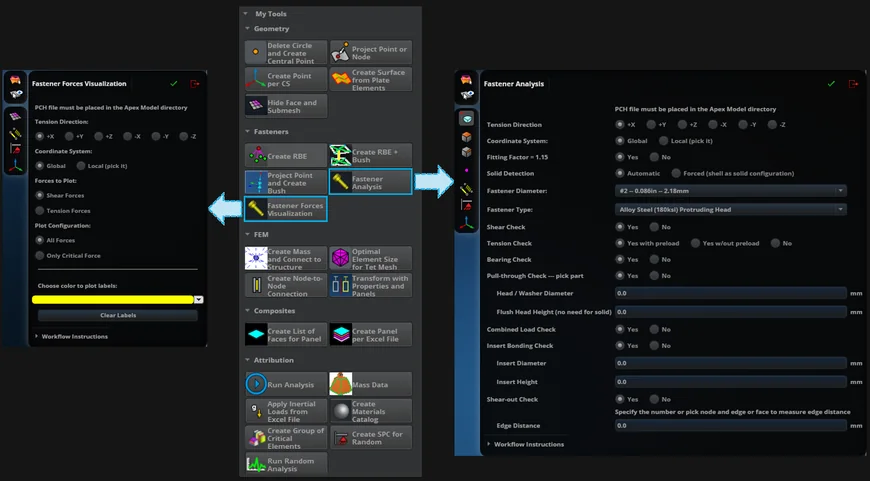
- Fastener strength in one click: my tool reads the forces of every fastener in every load case from the Nastran results, finds the critical fastener and load case and checks up to 7 failure modes with margins of safety
- Bolted joints in batch: my script builds hundreds of fastener spiders and spring elements in one run, for 2-layer and 3-layer stack-ups, on shell and solid meshes
- Composite laminates from Excel: my tool builds a laminate with dozens of plies, materials, fiber angles and ply drop-offs in seconds from a ply table the team can review
- Solver-ready input files: my tools export static, modal, buckling, transient and random vibration MSC Nastran decks from one standard template, with every mass, contact and output request included
- Random vibration setup: my tool sets the base excitation, the PSD spectrum, damping and a frequency grid refined around every natural frequency, axis by axis, with the output focused on the critical regions
- Load cases from a table: a script creates dozens of inertial load cases in seconds from the Excel load table, exactly as reviewed
- Symmetric parts done once: I copy or mirror a part, and my tool rebuilds its properties, complete laminates and fiber orientations on the copy
- Equipment in seconds: I add a mass at its center of gravity, and the tool connects it through its real mounting fasteners, so the interface loads come straight out of the analysis
- Design changes in minutes: after a re-mesh my tools rebuild the joints and regenerate the load cases, input files and fastener checks, instead of redoing them by hand
- Written by hand: about 12,000 lines of Python that I wrote, tested and debugged myself, method by method, so I know the formula behind every number the tools produce
Result
Methods and tools
Engineering inside the tools
- Preloaded tension: the bolt load is the preload plus a share of the applied tension, with built-in preload tables
- Thin-sheet shear: the shear allowable corrected for sheet thickness and fastener diameter
- Weakest ply governs: composite bearing and shear-out allowables come from the laminate, ply by ply
- Weight check: model mass by part and element type, composites ply by ply
Bolted joints: from CAD geometry to margins of safety
- 01
Clean
Every hole on a panel becomes a center point, and the holes are removed for a clean mesh
- 02
Connect
Complete 2-layer and 3-layer joints are built from the points, with spiders on every layer and springs in the order of the real load path
- 03
Load
Inertial load cases come from the Excel table, and the static input file is exported ready for MSC Nastran
- 04
Check
Every fastener in every load case: shear, tension with preload, bearing, pull-through, combined load, insert bonding and shear-out
- 05
Report
The critical fastener, load case and lowest margin, the thickness needed where a margin is negative, and force labels on the 3D model
After a design change: the repair tool rebuilds the joints on the new mesh, and the whole chain runs again in minutes